Our Short List of 3
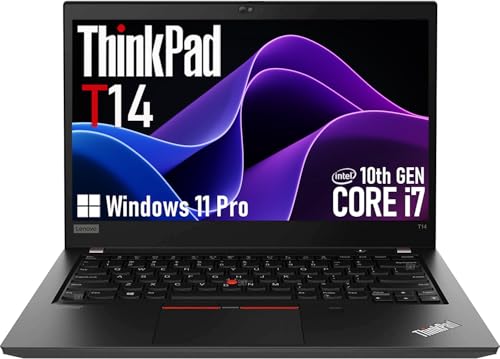
- Best for: Office workers who type for long periods and keep many programs open at once.
- Processor: Intel Core i7-10510U
- Memory: 16GB DDR4 RAM
- Storage: 512GB SSD
- Display: 14-inch Full HD, 1920 by 1080
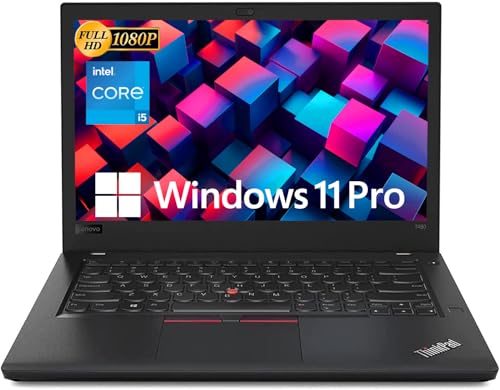
- Best for: Students and home workers who want a sturdy, practical laptop for daily documents and calls.
- Processor: Intel Core i5-8350U
- Memory: 16GB DDR4 RAM
- Storage: 512GB SSD
- Display: 14-inch Full HD

- Best for: Business users who want a newer processor and mainly store files in the cloud.
- Processor: Intel Core i5-1145G7
- Memory: 16GB DDR4 RAM
- Storage: 256GB SSD
- Display: 14-inch Full HD, 1920 by 1080
All 4 Picks at a Glance
| Product | Specs | Action |
|---|---|---|
| Lenovo ThinkPad T14 Gen 1 |
| Check price on Amazon |
| Lenovo ThinkPad T480 |
| Check price on Amazon |
| Dell Latitude 5420 |
| Check price on Amazon |
 HP EliteBook 840 G5 |
| Check price on Amazon |
Key takeaways
- Compare five renewed business laptops for work, study and everyday use, with clear specs, battery checks and buying guidance before you choose one.
A refurbished laptop forces a different decision from a new one. You are not only choosing a screen size and a processor, you are choosing how much wear and battery life you will accept in exchange for a stronger machine than a basic new model would offer. The best renewed business laptops were built for daily office work, so they usually arrive with sturdy hinges and comfortable keyboards. That trade works well only when the configuration matches the work you will actually do.
This guide is for students, home workers, office workers and families who need a dependable laptop for documents, video calls, browsing, study and light creative work. It is also for buyers who want a larger screen, more memory or a faster drive than a basic new machine would provide. Every laptop below was chosen from the name and specifications shown on its Amazon product page, with attention to processor, memory, storage, display and operating system.
Quick Picks
As an Amazon Associate we earn from qualifying purchases
| Product | Best for | Key spec from title |
|---|---|---|
| Lenovo ThinkPad T14 Gen 1 | Office work with a strong keyboard | Intel Core i7-10510U, 16GB DDR4 RAM, 512GB SSD |
| Lenovo ThinkPad T480 | Everyday work with flexible charging | Intel Core i5-8350U, 16GB DDR4 RAM, 512GB SSD |
| Lenovo ThinkPad T14s Gen 2 | Portable work with a modern AMD processor | AMD Ryzen 5 PRO 5650U, 16GB DDR4 RAM, 512GB SSD |
| Dell Latitude 5420 | Business use with a newer Intel processor | Intel Core i5-1145G7, 16GB DDR4 RAM, 256GB SSD |
| HP EliteBook 840 G5 | Business travel with a bright, clear display | Intel Core i5-8250U, 16GB DDR4 RAM, 512GB SSD |
How to Choose
Processor generation matters more than the brand name
A refurbished laptop can carry a processor from several generations ago, and that age shapes how smoothly it handles video calls, large documents and many browser tabs. An eleventh-generation Intel Core i5 or a Ryzen 5 PRO 5000-series chip will generally feel more responsive than an eighth-generation Core i5, especially when several applications run together. Check the exact processor code in the listing title, not only the words Core i5 or Ryzen 5, because the same family name covers very different speeds. A newer processor also tends to support newer wireless standards and a more recent version of Windows.
Memory and storage decide daily smoothness
Memory is the first specification to check after the processor, because too little memory makes even a capable processor feel slow. Sixteen gigabytes of RAM is a sensible target for work that involves documents, spreadsheets, video meetings and a browser full of tabs, while eight gigabytes can feel tight once several programs stay open. Storage matters in a different way: a solid-state drive makes the laptop start quickly and open files without long waits. A 256GB drive suits cloud-based work and a modest set of programs, while a 512GB drive gives more room for large files and installed software.
Battery health is the hidden variable
Battery condition varies more than any other part of a refurbished laptop, because one unit may have spent years plugged into a desk while another travelled every day. A listing that states a warranty period and a return window gives you time to test real battery life under your own routine, rather than trusting a single figure from a specification sheet. Charge the laptop fully, use it for normal work away from the charger, and note how quickly the charge falls during video calls. If the battery drops sharply or the laptop shuts down without warning, use the return window promptly.
Ports, display and keyboard shape the working day
Ports decide whether the laptop fits your desk without a drawer full of adapters. A USB-C port, an HDMI port and at least one full-size USB-A port cover most monitors, projectors and accessories, while a Thunderbolt port adds faster external storage and docking options on some models. The display deserves equal attention: a Full HD panel with a resolution of 1920 by 1080 keeps text sharp and gives enough room for two documents side by side, while a dim panel tires the eyes during long sessions. The keyboard matters just as much for anyone who types all day, so look for a backlit keyboard and well-spaced keys.
The 5 Best Options
Lenovo ThinkPad T14 Gen 1
- Best for: Office workers who type for long periods and keep many programs open at once.
- Processor: Intel Core i7-10510U
- Memory: 16GB DDR4 RAM
- Storage: 512GB SSD
- Display: 14-inch Full HD, 1920 by 1080
Office workers who type for long periods and keep many programs open at once.
Confirm the exact processor, memory and storage in the listing before ordering, because renewed ThinkPad listings can cover several configurations under similar titles.
The ThinkPad T14 Gen 1 suits buyers who want a traditional business laptop with a capable processor, generous memory and a large solid-state drive, without chasing the newest generation. Its tenth-generation Intel Core i7 processor handles office suites, video meetings, research and multitasking with room to spare, while sixteen gigabytes of memory keeps several programs open without constant reloading. The fourteen-inch Full HD display gives a clear view of documents and spreadsheets, and the backlit keyboard helps during evening work or dimly lit rooms. Windows 11 Pro adds business features for sign-in, device management and security, which makes this model a practical choice for home offices and small workplaces.
Lenovo ThinkPad T480
- Best for: Students and home workers who want a sturdy, practical laptop for daily documents and calls.
- Processor: Intel Core i5-8350U
- Memory: 16GB DDR4 RAM
- Storage: 512GB SSD
- Display: 14-inch Full HD
Students and home workers who want a sturdy, practical laptop for daily documents and calls.
Battery condition varies widely on this older model, so test battery life early and check the return terms before the window closes.
The ThinkPad T480 remains a useful choice for buyers who value repairability, a familiar business design and a configuration that covers everyday work without fuss. Its eighth-generation Intel Core i5 processor, sixteen gigabytes of memory and 512GB solid-state drive handle documents, email, browsing, video calls and study tasks comfortably, while the fourteen-inch Full HD display keeps text readable for long sessions. The inclusion of a Type-C port alongside HDMI gives useful flexibility for chargers, docks and external displays, and the backlit keyboard suits work in varied lighting. Windows 11 Pro is supplied, which keeps the machine aligned with current office software and security expectations for a renewed business laptop.
Lenovo ThinkPad T14s Gen 2
The ThinkPad T14s Gen 2 is the slimmer, more portable option in this group, and it pairs that lighter design with a modern AMD processor that handles multitasking well. Its Ryzen 5 PRO 5650U processor, sixteen gigabytes of memory and 512GB solid-state drive make it a strong match for office work, research and video meetings, while the fourteen-inch Full HD display keeps the machine easy to carry. Thunderbolt 4 adds a fast connection for docks and external storage, and HDMI covers direct connections to monitors. Windows 11 Pro completes a package that feels current enough for daily professional use, even though the machine itself is renewed.
Specs
- Processor: AMD Ryzen 5 PRO 5650U
- Memory: 16GB DDR4 RAM
- Storage: 512GB SSD
- Display: 14-inch Full HD
- Operating system: Windows 11 Pro
- Ports: HDMI, Thunderbolt 4
Best for: Mobile workers who carry a laptop often and want a modern processor in a slim business design.
Watch out for: Check the condition grade and the accessories included, because renewed units can arrive with a third-party charger rather than the original one.
ASIN: B0FL7BTYKX
Dell Latitude 5420
- Best for: Business users who want a newer processor and mainly store files in the cloud.
- Processor: Intel Core i5-1145G7
- Memory: 16GB DDR4 RAM
- Storage: 256GB SSD
- Display: 14-inch Full HD, 1920 by 1080
Business users who want a newer processor and mainly store files in the cloud.
The 256GB drive can fill quickly with large media files, so check your storage needs before choosing this configuration.
The Dell Latitude 5420 stands out here for its newer eleventh-generation Intel processor, which gives it an edge for video calls, multitasking and newer software. Its Intel Core i5-1145G7 processor, sixteen gigabytes of DDR4 memory and 256GB solid-state drive suit office work, study and everyday productivity, while the fourteen-inch Full HD display keeps documents and video clear. A camera is listed for video meetings, and HDMI provides a simple route to an external monitor. Windows 11 Pro is supplied, so the machine fits modern workplace software. The smaller drive is the main compromise, so this model suits buyers whose files live mainly in cloud storage.
HP EliteBook 840 G5
- Best for: Travellers and office workers who want a bright display, a slim body and plenty of storage.
- Processor: Intel Core i5-8250U
- Memory: 16GB DDR4 RAM
- Storage: 512GB M.2 PCIe NVMe SSD
- Display: 14-inch Full HD, 1920 by 1080, anti-glare
Travellers and office workers who want a bright display, a slim body and plenty of storage.
This is an older processor generation, so confirm that your software runs well on it and test the battery during the return window.
The HP EliteBook 840 G5 offers a polished business design with a clear fourteen-inch Full HD display, generous memory and a large solid-state drive. Its eighth-generation Intel Core i5-8250U processor, sixteen gigabytes of DDR4 memory and 512GB M.2 PCIe NVMe solid-state drive handle office documents, spreadsheets, video calls and browsing without strain, while the anti-glare display helps in bright rooms and near windows. USB Type-C and HDMI give flexible connections for monitors, docks and accessories, and Windows 11 Pro supports business sign-in and security features. The slim profile makes it easy to carry, and the large drive leaves room for programs and offline files.
Which One Fits Your Situation
You work from home and type all day
Choose the Lenovo ThinkPad T14 Gen 1, because its tenth-generation Core i7 processor, sixteen gigabytes of memory and backlit keyboard suit long writing and spreadsheet sessions. The 512GB drive leaves room for documents, installed programs and offline files, while the fourteen-inch Full HD display keeps text clear through a full working day. It is a steady, capable machine for a desk-based routine.
You are a student on a tight routine
Choose the Lenovo ThinkPad T480, because its sturdy business build, backlit keyboard and practical port selection cover lectures, assignments and video calls without unnecessary extras. The sixteen gigabytes of memory and 512GB drive handle research, documents and several open programs, while the familiar design makes it easy to use and to maintain. Test the battery first, then settle into a regular charging routine.
You carry your laptop between rooms and workplaces
Choose the Lenovo ThinkPad T14s Gen 2, because its slim design, modern Ryzen 5 PRO processor and Thunderbolt 4 port suit a mobile working pattern. It handles multitasking and video meetings well, connects easily to docks and external displays, and keeps the weight down for daily carrying. The 512GB drive also gives room for files you need offline.
You want the newest processor in this group
Choose the Dell Latitude 5420, because its eleventh-generation Intel Core i5 processor gives the most current performance here for video calls and multitasking. The sixteen gigabytes of memory and Full HD display support a modern office routine, while HDMI makes an external monitor simple to add. Plan your storage around the 256GB drive, using cloud storage or an external drive for larger files.
Common Mistakes
- Buying by brand or model name alone, without checking the exact processor code, memory and storage in the listing.
- Accepting eight gigabytes of memory for heavy multitasking, then finding the laptop slows down once many tabs and programs stay open.
- Ignoring battery health, and discovering too late that the laptop only lasts a short time away from a charger.
- Choosing a low-resolution display to save money, then struggling with blurry text and cramped windows during long work sessions.
- Waiting until after the return window closes to test the camera, microphone, keyboard, ports and battery under normal use.
Frequently Asked Questions
Are refurbished laptops reliable for everyday work?
A refurbished business laptop can be reliable for everyday work when it comes from a renewed programme and carries a clear return window. Business models were built for daily office use, so their keyboards, hinges and chassis often outlast lighter consumer designs. Still, condition varies by unit, so check the battery, keyboard, ports, camera and display during the return window and keep the packaging until you are satisfied.
How much memory should a refurbished laptop have?
Sixteen gigabytes of memory is a sensible target for most buyers, because it supports documents, spreadsheets, video calls and many browser tabs without constant reloading. Eight gigabytes can work for light use, such as a single document and a few tabs, but it leaves little headroom when programs accumulate. If you plan to keep the laptop for several years, choose sixteen gigabytes now.
Is a 256GB drive enough for a refurbished laptop?
A 256GB solid-state drive is enough when most files live in cloud storage, email or a small set of installed programs. It becomes tight when you store large media libraries, video projects or many offline files. A 512GB drive gives far more breathing room, so weigh your current storage use and your likely needs over the next year before deciding.
What should I check first after a refurbished laptop arrives?
Start with the physical condition, then charge the laptop fully and use it away from the charger during normal work. Check the keyboard, trackpad, display, camera, microphone, speakers, USB ports and HDMI connection, and confirm that the processor, memory, storage and operating system match the listing. Run your usual programs and join a video call, so any fault appears while the return window is still open.