Our Short List of 3

- Best for: Buyers who want the strongest graphics and the X3D chip variant in this guide.
- Processor: AMD Ryzen 9 9955HX3D
- Graphics: NVIDIA GeForce RTX 5090 laptop GPU
- Display: 240Hz 2560×1600 WQXGA
- Memory: 32GB DDR5 RAM
- Best for: Buyers who want the largest memory and storage with a 300Hz display.
- Processor: AMD Ryzen 9 9955HX
- Graphics: GeForce RTX 5070
- Display: 16-inch QHD+ 2.5K 300Hz IPS
- Memory: 32GB DDR5

- Best for: Buyers who want Ryzen 9 power with an RTX 5070 in a 16-inch machine.
- Processor: AMD Ryzen 9 8940HX
- Graphics: NVIDIA GeForce RTX 5070
- Display: 16-inch 2.5K QHD+ 240Hz
- Memory: 32GB DDR5
All 5 Picks at a Glance
| Product | Specs | Action |
|---|---|---|
| GIGABYTE AORUS Master 16 GEN 2 |
| Check price on Amazon |
| ASUS ROG Strix G16 5070 |
| Check price on Amazon |
| MSI Crosshair A16 HX |
| Check price on Amazon |
 ASUS ROG Strix G17 (2024) |
| Check price on Amazon |
 ASUS ROG Strix G16 5070 Ti |
| Check price on Amazon |
Key takeaways
- Compare five Ryzen 9 laptops with RTX graphics, high-refresh displays, and large memory, plus how to choose the right machine for gaming and work.
A Ryzen 9 laptop pairs a high-end AMD mobile processor with a discrete NVIDIA graphics card for demanding games and heavy multitasking. The catch is that the Ryzen 9 name covers several different chips, from the Ryzen 9 7940HX to the Ryzen 9 9955HX3D, and two laptops can carry very different processors, memory, and storage. Every pick below states its exact Ryzen 9 chip in its listing title, so the processor element comes from the listing rather than from a roundup description.
All five picks were corroborated from other sites’ laptop roundups, since this site has no Ryzen 9 laptop roundup. Three of the five are ASUS ROG Strix models, but each is a distinct model and configuration, and the other two come from GIGABYTE and MSI. Two listings carry bundle or accessory wording in their titles, stated openly wherever it applies, and no pick rests on article prose. Read the exact chip, graphics card, and memory and storage figures in the listing title before ordering.
Quick Picks
As an Amazon Associate we earn from qualifying purchases.
| Product | Best for | Key spec from title |
|---|---|---|
| GIGABYTE AORUS Master 16 GEN 2 | Strongest graphics in this guide | Ryzen 9 9955HX3D, RTX 5090, 240Hz WQXGA |
| ASUS ROG Strix G16 5070 | Largest memory and storage | Ryzen 9 9955HX, 32GB DDR5, 2TB SSD |
| MSI Crosshair A16 HX | Ryzen 9 power with an RTX 5070 | Ryzen 9 8940HX, RTX 5070, 240Hz QHD+ |
| ASUS ROG Strix G17 (2024) | Biggest screen in this guide | Ryzen 9 7940HX, 17.3-inch QHD 240Hz |
| ASUS ROG Strix G16 5070 Ti | High-refresh play with a MUX switch | Ryzen 9 8940HX, RTX 5070 Ti, MUX switch |
How to Choose
Confirm the exact Ryzen 9 chip in the listing title
Ryzen 9 is a family name, not a single processor, and the exact chip decides a laptop’s multi-threaded power. The chips in this guide run from the Ryzen 9 7940HX through the Ryzen 9 8940HX to the Ryzen 9 9955HX and the Ryzen 9 9955HX3D, and each is a different part. Check that the listing title states the full chip name, including the HX suffix, since a listing saying only Ryzen 9 without a chip number does not confirm the processor. Never treat a desktop Ryzen 9 chip, such as the Ryzen 9 9900X, as the same part as a laptop HX chip, and never confuse Ryzen AI branding with the Ryzen 9 HX line.
Match the graphics card and display to your games
The graphics card decides how well a laptop handles demanding games, and the picks here span the RTX 4070, the RTX 5070, the RTX 5070 Ti, and the RTX 5090 laptop GPU. A stronger card suits higher resolutions and heavier titles, while a mid-range card suits competitive games at lower settings and lighter creative work. Match the display too: the screens here run from 165Hz to 300Hz, and a higher refresh rate suits fast competitive play, while a sharper QHD+ or WQXGA panel suits story-driven games. Check the stated resolution and refresh rate in the listing title, since two laptops with the same card can carry very different screens, and a fast card behind a slow panel wastes its advantage.
Check memory, storage, and bundle wording
Memory and storage decide how many tasks a laptop juggles and how many large games it holds, and the listings here range from 16GB of DDR5 with a 1TB SSD to 32GB of DDR5 with a 2TB SSD. More memory suits streaming while gaming and heavier creative work, while larger storage suits big game libraries. Read bundle and accessory wording carefully: one listing here is sold with a bundle and another with an accessory, and the contents are part of what the listing covers. Confirm whether the listing is the factory configuration or a seller-upgraded build, and match the model number and the ASIN together, since the same model line can sell several configurations under similar names.
Weigh size, ports, and the operating system
Screen size changes how a laptop carries and where it gets used, and this guide covers 16-inch machines alongside one 17.3-inch machine. A 17.3-inch laptop suits a desk-first setup with a big display, while a 16-inch machine suits buyers who move between rooms or carry the laptop more often. Check the stated ports in the listing title, since Wi-Fi 6E, USB-C, HDMI, and RJ-45 Ethernet each suit different setups, and a wired Ethernet port matters for competitive play where a stable connection beats wireless. All five picks state Windows 11 in their listings; confirm the edition named in the title, and check the keyboard wording, since backlit and RGB keyboards differ between listings.
The 5 Best Options
GIGABYTE AORUS Master 16 GEN 2
- Best for: Buyers who want the strongest graphics and the X3D chip variant in this guide.
- Processor: AMD Ryzen 9 9955HX3D
- Graphics: NVIDIA GeForce RTX 5090 laptop GPU
- Display: 240Hz 2560×1600 WQXGA
- Memory: 32GB DDR5 RAM
Buyers who want the strongest graphics and the X3D chip variant in this guide.
The flagship graphics card and X3D chip put this machine at the top of the range, so confirm the full configuration in the listing title before ordering.
The GIGABYTE AORUS Master 16 GEN 2 is the flagship pick in this guide, pairing the Ryzen 9 9955HX3D processor with the RTX 5090 laptop GPU, 32GB of DDR5 memory, and a 2TB SSD behind a 240Hz WQXGA display. That combination suits the most demanding games and heavy creative work in one machine, and the high-refresh 2560×1600 panel keeps fast motion sharp. The listing names Windows 11 Home and a 5-Degree Black finish, and it is the only pick here with the 3D-stacked X3D chip variant, which sets it apart from the other Ryzen 9 chips in this guide.
Watch out for: The flagship graphics card and X3D chip put this machine at the top of the range, so confirm the full configuration in the listing title before ordering.
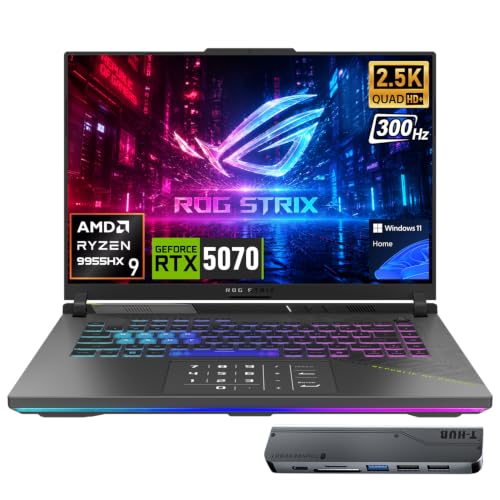
ASUS ROG Strix G16 5070
- Best for: Buyers who want the largest memory and storage with a 300Hz display.
- Processor: AMD Ryzen 9 9955HX
- Graphics: GeForce RTX 5070
- Display: 16-inch QHD+ 2.5K 300Hz IPS
- Memory: 32GB DDR5
Buyers who want the largest memory and storage with a 300Hz display.
The listing is sold with a bundle, so confirm the bundle contents and the exact configuration in the listing title before ordering.
The ASUS ROG Strix G16 5070 is the memory and storage pick, pairing the Ryzen 9 9955HX processor with the RTX 5070, 32GB of DDR5 memory, and a 2TB SSD behind a 16-inch QHD+ display running at 300Hz. The 300Hz panel suits competitive play where frame rate matters most, and the large memory and storage suit streaming while gaming and big game libraries. The listing also names a 4-zone RGB backlit keyboard, HDMI, Copilot, and Windows 11 Home, and it is sold with a bundle, so confirm the bundle contents in the listing before ordering.
Watch out for: The listing is sold with a bundle, so confirm the bundle contents and the exact configuration in the listing title before ordering.
MSI Crosshair A16 HX
- Best for: Buyers who want Ryzen 9 power with an RTX 5070 in a 16-inch machine.
- Processor: AMD Ryzen 9 8940HX
- Graphics: NVIDIA GeForce RTX 5070
- Display: 16-inch 2.5K QHD+ 240Hz
- Memory: 32GB DDR5
Buyers who want Ryzen 9 power with an RTX 5070 in a 16-inch machine.
MSI sells several Crosshair variants with similar names, so match the model number E8WGK-009US in the listing title before ordering.
The MSI Crosshair A16 HX pairs the Ryzen 9 8940HX processor with the RTX 5070, 32GB of DDR5 memory, and a 1TB NVMe SSD behind a 16-inch 2.5K QHD+ display running at 240Hz. That balance suits buyers who want Ryzen 9 power with a current-generation mid-range graphics card, without stepping up to the flagship tier. The listing names Wi-Fi 6E, USB-C, and Windows 11 Home, and the Gunmetal Grey finish with model number E8WGK-009US identifies the exact configuration covered here, so match the model number before ordering a different Crosshair variant.
Watch out for: MSI sells several Crosshair variants with similar names, so match the model number E8WGK-009US in the listing title before ordering.
ASUS ROG Strix G17 (2024)
- Best for: Buyers who want the biggest screen in this guide for desk-first play.
- Processor: AMD Ryzen 9 7940HX
- Graphics: NVIDIA GeForce RTX 4070
- Display: 17.3-inch QHD 240Hz
- Memory: 16GB DDR5
Buyers who want the biggest screen in this guide for desk-first play.
The 17.3-inch chassis is the largest in this guide, so confirm the desk space and carrying weight suit your setup before ordering.
The ASUS ROG Strix G17 from 2024 is the big-screen pick, pairing the Ryzen 9 7940HX processor with the RTX 4070, 16GB of DDR5 memory, and a 1TB PCIe Gen4 SSD behind a 17.3-inch QHD display running at 240Hz. The larger screen suits immersive story-driven games and detail work at a desk, and the listing names Wi-Fi 6E and Windows 11 alongside model number G713PI-DB94. It carries the previous-generation graphics card in this guide, which suits buyers who value screen size over the newest GPU, and the 240Hz panel still covers fast competitive play.
Watch out for: The 17.3-inch chassis is the largest in this guide, so confirm the desk space and carrying weight suit your setup before ordering.
ASUS ROG Strix G16 5070 Ti
- Best for: Buyers who want a MUX switch and wired Ethernet for competitive play.
- Processor: AMD Ryzen 9 8940HX
- Graphics: RTX 5070 Ti 12GB GDDR7, 140W TGP
- Display: 16-inch WUXGA 165Hz LED
- Memory: 32GB DDR5 RAM
Buyers who want a MUX switch and wired Ethernet for competitive play.
The listing is sold with an accessory, so confirm the accessory and the exact configuration in the listing title before ordering.
The ASUS ROG Strix G16 5070 Ti pairs the Ryzen 9 8940HX processor with the RTX 5070 Ti carrying 12GB of GDDR7 memory at 140W TGP, 32GB of DDR5 memory, and a 1TB SSD behind a 16-inch WUXGA display running at 165Hz. The MUX switch suits buyers who want direct graphics routing for competitive play, and the listing names RGB backlit keys, Wi-Fi 6E, and an RJ-45 Ethernet port for wired play. It is sold with an accessory, so confirm the accessory in the listing before ordering, and note that its display resolution and refresh rate sit below the sharper panels elsewhere in this guide.
Watch out for: The listing is sold with an accessory, so confirm the accessory and the exact configuration in the listing title before ordering.
Which One Fits Your Situation
You want the strongest graphics for demanding games
Choose the GIGABYTE AORUS Master 16 GEN 2. Its RTX 5090 laptop GPU and Ryzen 9 9955HX3D processor suit the heaviest titles and creative work, and its 240Hz WQXGA display keeps demanding games sharp. The 32GB of memory and 2TB SSD suit large libraries and multitasking, so it is the pick when no compromise on graphics power is acceptable.
You want the biggest screen for immersive play
Choose the ASUS ROG Strix G17 from 2024. Its 17.3-inch QHD display at 240Hz suits story-driven games and detail work at a desk, and its Ryzen 9 7940HX processor with RTX 4070 graphics covers modern titles well. Accept the larger chassis and the previous-generation graphics card in exchange for the biggest panel in this guide.
You want Ryzen 9 power without the flagship tier
Choose the MSI Crosshair A16 HX or the ASUS ROG Strix G16 5070 Ti. Both carry the Ryzen 9 8940HX processor with 32GB of memory and a 1TB SSD, and both suit buyers who want strong multi-threaded power with a mid-range or upper mid-range graphics card. The Crosshair suits buyers who want the sharper 240Hz QHD+ panel, while the Strix suits buyers who want a MUX switch and wired Ethernet.
You want maximum memory and storage in one listing
Choose the ASUS ROG Strix G16 5070. Its 32GB of DDR5 memory and 2TB SSD suit streaming while gaming and big game libraries, and its 300Hz display suits competitive play where frame rate matters most. Confirm the bundle contents in the listing, since the bundle is part of what this listing covers.
Common Mistakes
- Treating Ryzen 9 as one processor, when the 7940HX, 8940HX, 9955HX, and 9955HX3D are different chips with different performance.
- Assuming every ASUS ROG Strix G16 listing shares one configuration, when the same model line sells several chips, graphics cards, and memory sizes under similar names.
- Confusing Ryzen AI branding with the Ryzen 9 HX line, since the two use different naming and different parts.
- Treating article prose about a processor as listing wording, when only the listing title itself confirms which chip a machine carries.
- Ignoring bundle or accessory wording in a listing title, then receiving extra items or a different configuration than expected.
Frequently Asked Questions
Is a Ryzen 9 laptop overkill for gaming?
Not for buyers who multitask heavily. A Ryzen 9 HX chip suits streaming while gaming, video editing, and heavy multitasking alongside play, where extra cores keep background tasks from stealing game performance. Buyers who only play lighter titles and do little else can manage with a lower-tier processor, but the picks here suit buyers who want one machine for play and work alike.
What does the HX suffix mean on a Ryzen 9 laptop chip?
The HX suffix marks a high-power laptop processor class built for sustained multi-threaded work, as opposed to lower-power laptop chips that prioritise battery life. HX chips suit desk-first gaming laptops with stronger cooling, and they pair with discrete graphics cards in the machines in this guide. Check the full chip name in the listing title, since the HX suffix alone does not say which generation the chip belongs to.
Do all five picks carry the same Ryzen 9 chip?
No. The picks carry four different chips: the Ryzen 9 7940HX, the Ryzen 9 8940HX, the Ryzen 9 9955HX, and the Ryzen 9 9955HX3D. Two picks share the 8940HX, but they are different brands and models with different graphics cards and displays. Match the exact chip in the listing title to the performance you need, and never assume two listings with the Ryzen 9 name share a processor.
Why do two listings mention a bundle or an accessory?
Because those listings are sold that way. One Strix G16 listing states it is sold with a bundle, and the other states it is sold with an accessory, and that wording is part of the listing title. Confirm the bundle or accessory contents before ordering, since the extra items are part of the purchase, and match the model number and ASIN together to avoid a different configuration.