Key takeaways
- Compare five ergonomic executive chairs with adjustable lumbar support, from firmness dials to self-adaptive mesh backs, and find the right fit.
An executive chair purchase usually goes wrong at the lower back. Plenty of high-back chairs advertise lumbar support, yet the pad sits at a fixed height and pushes at a fixed depth, which helps only the narrow band of bodies it was shaped for. The real decision is how the support adjusts: a dial that changes firmness, pads that move up and down, or a flexible system that follows your spine as you shift between calls, documents, and reclined thinking.
This guide is for executives and senior staff who sit eight or more hours a day, home-office professionals upgrading from a basic task chair, and taller or heavier buyers who need support that can be repositioned rather than endured. Every chair below is sold on Amazon, and each was chosen because its own product page describes a genuinely adjustable lumbar mechanism, with the adjustment type named in its section.
Quick Picks
As an Amazon Associate we earn from qualifying purchases
| Product | Best for | Key spec from title |
|---|---|---|
| Steelcase Leap V2 | Dial-in lumbar firmness | Lower back firmness dial, 3D LiveBack |
| Herman Miller Aeron Chair (Size A) | Breathable mesh for long days | Adjustable PostureFit SL lumbar pads |
| SIHOO Doro C300 | Support that adapts on its own | Self-adaptive dynamic lumbar support |
| Hbada E3 Air | Big and tall sitters | 3-zone dynamic lumbar, 8-way adjustment |
| Duramont Ergonomic Office Chair | Manual 4D lumbar positioning | Lumbar adjusts up, down, in, and out |
How to Choose
Decide How the Lumbar Support Should Adjust
Adjustment comes in three flavours, and they feel very different by hour six. A firmness dial, like the one on the Leap below, changes how hard the support pushes without moving it. Height-and-depth pads, such as the Duramont’s 4D pad, let you place pressure exactly on your lumbar curve. Self-adaptive systems, used by the SIHOO and Hbada chairs here, flex and follow your back automatically. Pick based on whether you like to set support once, tune it precisely, or never think about it again.
Match the Frame Size to Your Body
Executive chairs are not one-size-fits-all, even when the listing implies they are. The Aeron below is sold in sizes A, B, and C, and choosing the wrong one leaves the lumbar pads pressing in the wrong place no matter how you adjust them. Heavier sitters should check the stated capacity, such as the 330 lb figure on the Hbada listing, and taller buyers should confirm backrest height and seat depth ranges. A chair that fits your frame makes the lumbar adjustment usable; one that does not makes it irrelevant.
Separate the Lumbar Dial From the Tilt Controls
Product photos often cluster every knob together, which hides an important distinction. Tilt tension, tilt lock, and recline angle change how the whole backrest moves, while the lumbar control changes only the support pressing into your lower back. Before ordering, identify which control does what on the listing diagram. Chairs like the Leap keep a dedicated lower back firmness dial, so you can soften the recline without losing support, or firm up the support while keeping a relaxed tilt for reading.
Check What the Rest of the Chair Adjusts
Lumbar support works as part of a system. Armrests that set too high shrug your shoulders and undo the backrest’s work, and a seat that is too deep pushes you away from the lumbar pad entirely. Look for adjustable seat depth, armrest height, and headrest position alongside the lumbar mechanism. The chairs below pair their lumbar systems with sliding seats, multi-direction armrests, or adjustable backrest heights, so the support stays in contact with your back instead of becoming a feature you sit in front of.
The 5 Best Options
Steelcase Leap V2

The Leap suits executives who want to set their lower-back support deliberately and then trust it through a full day of posture changes. Its 3D LiveBack backrest flexes with the shape of your spine, while a dedicated lower back firmness dial lets you increase or soften the lumbar pressure without touching the tilt settings. Steelcase’s Natural Glide System slides the seat forward as you recline, keeping you close to your desk instead of drifting away from it. Four-way adjustable arms and five reclining positions round out a chair built around small, precise corrections.
Specs
- 3D LiveBack technology that contours to the spine
- Lower back firmness dial for lumbar pressure
- Natural Glide System seat movement while reclining
- 4D adjustable arms
- 5 reclining positions
- Colour: Onyx, black frame
Best for: Managers who like firm, dialled-in lumbar pressure that stays put all day.
Watch out for: Amazon offers for this model come from several sellers, including remanufactured units, so confirm the listing describes a chair with the lumbar dial and check which warranty the seller provides.
Herman Miller Aeron Chair (Size A, Graphite)

The Aeron is the pick for executives who run warm in a leather or foam chair and want support built into a suspension mesh instead. Its Adjustable PostureFit SL system uses two independent pads that flex separately, one stabilising the sacrum and the other supporting the lumbar curve, and both can be adjusted to follow your spine. The 8Z Pellicle seat and back let air pass through rather than trapping heat during long sessions. Fully adjustable arms move in height, slide forward and back, and pivot, so your shoulders can stay level with your desk.
Specs
- Adjustable PostureFit SL sacral and lumbar support with two independent pads
- 8Z Pellicle suspension seat and back
- Fully adjustable arms: 6.8 to 10.8 inches above the seat, 2.5-inch slide range, pivoting
- Size A frame, graphite finish
- Seat depth: 16 inches
- Item weight: 40 pounds
- Dimensions: 25.75 x 25.75 x 38.5 inches
Best for: Petite executives who want breathable mesh and adjustable sacral-lumbar pads in a smaller frame.
Watch out for: This ASIN is the Size A frame; sizes B and C are separate variants that sell out independently, so confirm your size is the one in stock before ordering, and note that no headrest is included.
SIHOO Doro C300

Choose the Doro C300 if you would rather have the chair manage lumbar support than manage it yourself. Its self-adaptive dynamic lumbar system moves with your body as you lean, turn, and recline, maintaining contact with your lower back without a dial to set. The backrest itself adjusts through four height positions over a 2.36-inch range, which is how you place the support zone on your own frame. A weight-sensing chassis balances the recline automatically, and the full mesh build keeps the chair breathable through long, warm workdays.
Specs
- Self-adaptive dynamic lumbar support
- Backrest height adjustable in 4 positions, 2.36-inch range
- Ultra-soft 3D armrests
- Three tilt positions: 110, 120, and 130 degrees
- Intelligent weight-sensing recline mechanism
- Fully breathable mesh backrest and seat
Best for: Executives who shift posture constantly and want lumbar support that follows automatically.
Watch out for: The lumbar support is self-adaptive rather than manually adjustable, so if you want to set an exact pressure with a dial, the Leap or Duramont below will suit you better; footrest versions of this chair are sold under different ASINs.
Hbada E3 Air

The E3 Air is built for bigger, taller executives who find standard chairs undersized and their lumbar pads too small to matter. Hbada’s three-zone dynamic lumbar support wraps a wider area of the waist and adjusts eight ways, spreading pressure across the L1 to L5 region instead of concentrating it on one small pad. The listing also describes an adjustable seat depth and a gravity-sensing chassis that balances recline against your body weight. A 3D adjustable headrest and 3D armrests complete a chair aimed squarely at long, heavily built workdays.
Specs
- 3-zone dynamic elastic lumbar support with 8-way adjustment
- T-Shape support system frame
- 3D adjustable headrest
- 3D adjustable armrests
- Recline up to 140 degrees
- Adjustable seat depth
- Gravity-sensing chassis
- Weight capacity: 330 pounds (per listing)
- Colour: Grey, no footrest
Best for: Big and tall sitters who need a wide, multi-zone lumbar wrap and a higher capacity frame.
Watch out for: This ASIN is the grey, no-footrest version; the footrest edition and other colours are separate listings, and the elastic lumbar zones feel springier than a firm dialled pad, which not every back prefers.
Duramont Ergonomic Office Chair
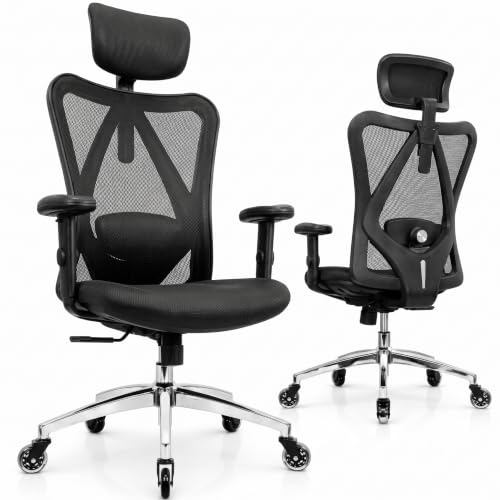
The Duramont is the straightforward manual option in this group: a high-back mesh executive chair whose lumbar pad adjusts in four directions, moving up, down, in, and out until it sits against your own curve. That range makes it a sensible choice when several people of different builds share one office chair, because each user can reposition the pad in seconds. A thick memory foam seat cushion softens the sitting surface that mesh-only chairs lack, and the rollerblade-style wheels roll quietly across hard floors. Adjustable headrest and armrests, plus multiple recline angles with a tilt tension control, complete the setup.
Specs
- 4D adjustable lumbar support: up, down, in, and out
- High back with breathable mesh
- Thick memory foam seat cushion
- Adjustable headrest and armrests
- 3 reclining positions with tilt tension control
- Rollerblade wheels
- Model: Duramont 6
- Dimensions: 42 x 26 x 42 inches
- Warranty: 5 years (per listing)
Best for: Shared executive offices where different sitters need to reposition the lumbar pad quickly.
Watch out for: One recent Amazon snapshot showed no featured offer for this listing, so check the seller list and delivery terms before ordering; the chair also arrives flat-packed and needs self-assembly.
Which One Fits Your Situation
You Sit Through Back-to-Back Video Calls
Pick the SIHOO Doro C300. Calls keep you seated and mostly still, but you still lean, turn to a second screen, and settle deeper as the hours stack up. Its self-adaptive lumbar system follows those small movements without any input from you, and the four-position backrest height lets you place the support zone correctly during setup. The full mesh build also helps when a small home office warms up by midday.
Your Lower Back Aches by Mid-Afternoon
Start with the Steelcase Leap V2. Ache that builds through the day often means the support pressure is wrong rather than absent, and the Leap’s firmness dial addresses exactly that: you can increase pressure when you sit upright for focused work and soften it later. The Duramont is the alternative if your ache comes from pad placement, since its 4D pad moves in and out as well as up and down until it meets your curve.
You Are Taller or Heavier Than Average
Look at the Hbada E3 Air first. Its listing states a 330-pound capacity, the lumbar support spans three zones across a wide waist area, and the seat depth adjusts so longer legs do not push you off the support. If you prefer a sized frame instead, the Aeron range runs to a Size C variant, though that is a separate listing from the Size A shown here, so check availability for the larger frame before deciding.
Several People Share One Office Chair
The Duramont Ergonomic Office Chair handles sharing best. Its lumbar pad repositions in four directions with no tools, the headrest and armrests adjust for different heights, and the seat height covers a wide range of desk setups. Each person can reset the chair in under a minute. The Leap also works for sharing thanks to its dial, but its adjustments take a little longer to learn the first time.
Common Mistakes
- Buying a chair with fixed lumbar support because the listing photographs a prominent pad, then discovering it presses above or below your actual lumbar curve.
- Ordering the wrong Aeron size, or the wrong variant of a chair, when colours, footrest editions, and frame sizes are sold under separate ASINs.
- Setting the lumbar support once on the first morning and never revisiting it after your seat height or desk changes.
- Confusing tilt tension with lumbar firmness, then reclining against a softened backrest while wondering why support disappeared.
- Ignoring stated weight capacity and seat depth, which matter more to lumbar contact than any single adjustment dial.
Frequently Asked Questions
Is adjustable lumbar support worth it on an executive chair?
For anyone seated most of the working day, yes, because fixed pads only fit the body shape the designer averaged. Adjustable systems, whether a firmness dial, a four-direction pad, or a self-adaptive flex panel, let the support meet your own lumbar curve. That contact is what keeps posture support consistent from morning to evening.
Which type of lumbar adjustment is best: dial, pad, or self-adaptive?
Each suits a different habit. A firmness dial, as on the Leap, is best when you know you like strong, steady pressure. A movable pad, like the Duramont’s, helps when placement is the problem. Self-adaptive systems on the SIHOO and Hbada chairs suit people who move around a lot and would never adjust a dial after the first week.
How do I set lumbar support at the right height?
Sit fully back so your hips touch the backrest, then position the support in the small of your back, roughly at belt-line height, where the spine curves inward. It should feel like gentle pressure filling that curve, not a hard push. If the chair offers depth adjustment, add only enough depth that you notice support without being pushed forward.
Can an ergonomic executive chair fix existing back pain?
A chair cannot treat a medical condition, and persistent pain deserves professional advice. What an adjustable chair can do is remove common aggravating factors: unsupported lumbar curves, seats that are too deep, and armrests that shrug your shoulders. Many buyers find that correct, adjustable support reduces the end-of-day ache caused by their previous chair, which is the realistic expectation to set.