Our Short List of 3
All 5 Picks at a Glance
| Product | Specs | Action |
|---|---|---|
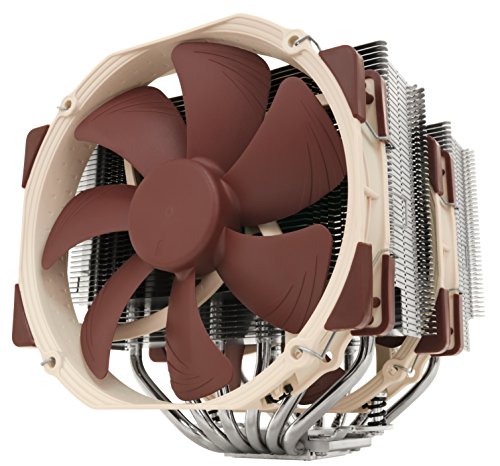 1. Noctua NH-D15 | Check price on Amazon | |
 2. Thermalright Peerless Assassin 120 SE | Check price on Amazon | |
 3. Thermalright Phantom Spirit 120 SE | Check price on Amazon | |
 4. ARCTIC Freezer 36 A-RGB | Check price on Amazon | |
 5. Noctua NH-U12A chromax.black | Check price on Amazon |
Key takeaways
- Best selling CPU coolers: five air coolers compared on tower size, heat pipes, fan speed, noise, socket support and case clearance for desktop builds.
Disclosure: As an Amazon Associate, this site may earn from qualifying purchases made through links on this page.
Intro
A CPU cooler decides how hard a processor can work before heat forces it to slow down, and the air coolers that sell in the largest numbers tend to share the same shape: a tower of thin aluminium fins, copper heat pipes, and one or two fans that push air through the fins. The models in this guide are the air coolers that keep showing up in build lists and best-seller charts, from a dual-tower flagship that has held its place for years to a dual-tower budget pick that matches it on paper.
Every pick here is an air cooler, not a liquid cooler: no pump, no radiator, no liquid in the loop, and nothing that can leak. The trade is size, and the five coolers here cover the range from a compact 120mm single tower that fits almost any mid-tower case to a 140mm dual tower that needs a wide case and low-profile memory.
One thing to settle before you buy: measure your case. A cooler that is 165mm tall needs a case rated for at least that height, and a dual-tower cooler can overhang the first RAM slot, so tall memory with large heat spreaders may not fit under the front fan. Check the cooler height, the RAM clearance, and the socket support against your own board before you order.
At a Glance
- Noctua NH-D15 — the dual-tower benchmark, two 140mm fans, six heat pipes, 165mm tall.
- Thermalright Peerless Assassin 120 SE — the dual-tower budget pick, two 120mm fans, six heat pipes, 155mm tall.
- Thermalright Phantom Spirit 120 SE — seven heat pipes in the same dual-tower shape, 154mm tall.
- ARCTIC Freezer 36 A-RGB — single tower with two fans in push-pull, four heat pipes, 159mm tall.
- Noctua NH-U12A chromax.black — the compact single tower, two 120mm fans, six heat pipes, 158mm tall.
How to Choose
Begin with tower size and case clearance, because a cooler that does not fit is a cooler you return. Dual-tower coolers hold two fin stacks side by side with a fan between them, and they cool the most, but they are the tallest and widest coolers in this guide. A single-tower cooler holds one fin stack and fits in more cases, and a 120mm single tower is the shape that suits a mainstream build with a mid-range processor. Measure the space from the CPU socket to the side panel, and compare it with the cooler height in the table below.
Heat pipes carry heat from the CPU to the fins, and more pipes with a larger diameter move more heat. A six-pipe dual tower handles a high-end desktop chip under a sustained load, while a four-pipe single tower suits a mid-range chip that spends most of its time at light loads. The pipe count is not the whole story, because fin density and fan pressure matter too, but it is a useful first filter when you compare two coolers of the same shape.
Fan size decides noise more than any other number. A 140mm fan moves the same air as a 120mm fan at a lower speed, and a lower speed means less noise. The NH-D15 uses two 140mm fans, which is one reason it stays quiet under load, while the 120mm coolers in this guide spin faster to move the same air. A fan that lists a low maximum noise figure is a good sign, but the number that matters in daily use is the noise at the speed your fan curve actually uses, and a PWM fan that follows the motherboard curve will spend most of its life well below its maximum speed.
Socket support is the detail that causes the most returns. A cooler that shipped before a new socket launched may need a mounting kit, which may ship in the box with current stock or arrive separately. Check the listing for your socket — Intel LGA 1700, LGA 1851, LGA 1200, AMD AM5 and AM4 — before you order.
RAM clearance is the second detail that causes returns. A dual-tower cooler overhangs the RAM slots, and the front fan sits above the first slot. Low-profile memory clears it, while tall memory with large heat spreaders may touch the fan. The NH-U12A is built around this problem, with an asymmetrical tower that leaves the RAM slots clear, and it is the pick in this guide for a build with tall memory.
Thermal compound ships with every cooler here, and the compound in the box is good enough for a first build. A tube in the box also lets you remount the cooler later. The ARCTIC Freezer 36 ships with MX-6, and the Noctua coolers ship with NT-H1.
The Picks
1. Noctua NH-D15
The NH-D15 is the dual-tower air cooler that other air coolers are measured against, and it has held that place for years. Two 140mm NF-A15 fans sit on a dual tower with six heat pipes, spinning to a maximum of 1500 RPM with a maximum noise figure of 24.6 dB(A) and an airflow figure of 140.2 cubic metres per hour. The cooler stands 165mm tall and weighs 1320 grams with both fans fitted, and it ships with the SecuFirm2 mounting system for Intel and AMD sockets.
The size is the point. Two 140mm fans move a large volume of air at a low speed, so the cooler holds a high-end processor under a sustained load without the fans spinning up to an intrusive speed. The six heat pipes run through two fin stacks, and the surface area of those stacks is what lets the cooler shed heat as fast as the processor makes it.
The honest catch is the footprint. At 165mm tall and 150mm wide, the NH-D15 needs a wide case, and the front fan overhangs the first RAM slot, so tall memory may not fit. A low-noise adaptor ships in the box for builders who want a lower maximum speed without touching the fan curve. Check the Noctua NH-D15 on Amazon
Who it suits: a builder who wants the most capable air cooler in this group and has a wide case with low-profile memory. Keep in mind: 165mm tall, wide enough to overhang the first RAM slot, and the brown frame is a matter of taste.
2. Thermalright Peerless Assassin 120 SE
The Peerless Assassin 120 SE is the dual-tower cooler that made dual-tower cooling affordable, and it is the pick in this group for a builder who wants dual-tower performance without the flagship outlay. Two 120mm TL-C12C fans sit on a dual tower with six heat pipes built around AGHP technology, spinning to 1550 RPM. The cooler stands 155mm tall, which is 10mm shorter than the NH-D15, and that shorter height fits in more mid-tower cases.
The plain version in this guide has no lighting, and the black finish suits a dark build. The two fans run in push-pull, with one fan pushing air into the fin stacks and the second pulling it out the other side, which is the arrangement that gets the most from a dual tower. The cooler ships with mounting hardware for Intel LGA 1700, 1200, and 115x sockets and AMD AM4 and AM5, and the base is a nickel-plated copper plate machined flat for good contact with the processor.
The honest catch is the fan noise at the top of the range. The 120mm fans spin faster than the 140mm fans on the NH-D15 to move the same air, and the cooler is louder at full speed than the flagship picks in this group. At the mid-range speeds an air-cooled build uses most of the time, the difference is small. Check the Thermalright Peerless Assassin 120 SE on Amazon
Who it suits: a builder who wants dual-tower cooling on a mainstream budget and has a case that fits a 155mm tower. Keep in mind: louder at full speed than the 140mm picks, and the 120mm fans need a higher speed to match their airflow.
3. Thermalright Phantom Spirit 120 SE
The Phantom Spirit 120 SE takes the same dual-tower shape as the Peerless Assassin and adds a seventh heat pipe, and it is the pick in this group for a builder who wants the most heat-pipe capacity in a 120mm dual tower. Two 120mm TL-C12B V2 fans sit on a dual tower with seven 6mm heat pipes, and the cooler stands 154mm tall with an airflow figure of 66.17 CFM. The S-FDB bearing in the fans is built for long service with the cooler mounted in either orientation.
The seventh pipe is the difference that matters on a hot chip. Under a sustained all-core load, the extra pipe gives the cooler more paths to move heat from the base to the fins, and the dual-tower layout gives that heat more surface area to leave from. The cooler is a best seller in the CPU cooling category on Amazon, and the black finish suits a dark build.
The honest catch is the same as the Peerless Assassin: two 120mm fans spinning to move air through dense fins are louder at full speed than a 140mm design. The cooler also overhangs the first RAM slot, so tall memory may need the front fan raised or moved. Check the Thermalright Phantom Spirit 120 SE on Amazon
Who it suits: a builder with a hot chip who wants seven heat pipes in a 154mm dual tower. Keep in mind: 120mm fans at full speed are louder than 140mm fans, and the front fan overhangs the first RAM slot.
4. ARCTIC Freezer 36 A-RGB
The Freezer 36 A-RGB is the single-tower pick in this group, and it is the cooler for a builder who wants a compact tower with two fans. A single fin stack with four heat pipes carries two 120mm P fans in push-pull, spinning from 200 to 2000 RPM on a fluid-dynamic bearing. The cooler stands 159mm tall, and a tube of MX-6 thermal compound ships in the box. The A-RGB lighting in the fans suits a build with a windowed side panel, and the lighting runs from a standard connector on the board.
The push-pull arrangement is what makes this single tower work as well as it does. One fan pushes air into the fins and the second pulls it out, so the air spends less time in the stack and the cooler sheds heat faster than a single-fan tower of the same size. The 159mm height fits in most mid-tower cases, and the single-tower shape leaves the RAM slots clear, which is the detail that matters for a build with tall memory.
The honest catch is the pipe count. Four heat pipes move less heat than the six or seven pipes in the dual-tower picks, so this cooler suits a mid-range processor better than a high-end chip under a sustained load. The lighting also needs a header on the board, so check that your board has a spare connector before you order. Check the ARCTIC Freezer 36 A-RGB on Amazon
Who it suits: a builder with a mid-range processor who wants a compact single tower with two fans and lighting. Keep in mind: four heat pipes suit a mid-range chip better than a high-end one, and the lighting needs a header on the board.
5. Noctua NH-U12A chromax.black
The NH-U12A chromax.black is the compact single tower for a builder who wants Noctua engineering without the brown frame and without the width of a dual tower. Two 120mm NF-A12x25 fans sit on a single tower with six heat pipes, spinning to 2000 RPM with a maximum noise figure of 22.6 dB(A). The cooler stands 158mm tall, and the asymmetrical tower leaves the RAM slots clear, so tall memory fits without moving a fan.
The two NF-A12x25 fans are the reason this single tower cools as well as it does. The tight gap between the blade tips and the frame holds pressure against the fins, and the SSO2 bearing stays quiet with the fan mounted horizontally. The black-coated heatsink and black fans suit a dark build, and the cooler ships with NT-H1 compound and the SecuFirm2 mounting system.
The honest catch is the ceiling. A single tower with 120mm fans has less surface area than a dual tower, so on a very hot chip under a sustained load it has less headroom than the NH-D15 or the Phantom Spirit. For a mainstream or upper mid-range processor, that ceiling rarely matters. Check the Noctua NH-U12A chromax.black on Amazon
Who it suits: a builder with tall memory who wants a black Noctua cooler that fits in a standard mid-tower case. Keep in mind: a single tower has less headroom than a dual tower on a very hot chip.
Comparison Table
| Model | Type | Fans | Heat pipes | Height | Max speed | Noise |
|---|---|---|---|---|---|---|
| Noctua NH-D15 | Dual tower | 2x 140mm | 6 | 165mm | 1500 RPM | 24.6 dB(A) |
| Thermalright Peerless Assassin 120 SE | Dual tower | 2x 120mm | 6 | 155mm | 1550 RPM | Not listed |
| Thermalright Phantom Spirit 120 SE | Dual tower | 2x 120mm | 7 | 154mm | Not listed | Not listed |
| ARCTIC Freezer 36 A-RGB | Single tower | 2x 120mm | 4 | 159mm | 2000 RPM | Not listed |
| Noctua NH-U12A chromax.black | Single tower | 2x 120mm | 6 | 158mm | 2000 RPM | 22.6 dB(A) |
Which One Fits Your Situation
- A high-end processor in a wide case: the Noctua NH-D15, because two 140mm fans and a dual tower hold the most heat with the least noise.
- A dual tower on a mainstream budget: the Thermalright Peerless Assassin 120 SE, because it brings the dual-tower shape to a 155mm height that fits more cases.
- A hot chip that needs the most heat pipes: the Thermalright Phantom Spirit 120 SE, because seven pipes give the cooler more paths to move heat from the base.
- A mid-range processor with tall memory: the ARCTIC Freezer 36 A-RGB, because the single tower leaves the RAM slots clear and the push-pull fans do the work of a bigger tower.
- A black Noctua build with tall memory: the Noctua NH-U12A chromax.black, because the asymmetrical tower clears the RAM and the fans stay quiet.
FAQ
Do I need a dual-tower cooler, or is a single tower enough?
A single tower is enough for a mid-range processor that spends most of its time at light loads. A dual tower justifies its size on a high-end chip under a sustained load, where the extra fin area and the second fan keep the processor from slowing down. Match the cooler to the chip, not to the case window.
How do I know if a cooler fits my case?
Measure the space from the CPU socket to the side panel and compare it with the cooler height. A case lists a maximum cooler height in its specifications, and the cooler must be shorter than that number. Also check the RAM clearance: a dual-tower cooler overhangs the first RAM slot, so tall memory may not fit under the front fan.
What socket support should I check before I order?
Check that the listing names your socket. Current Intel sockets are LGA 1700 and LGA 1851, and current AMD sockets are AM5 and AM4. A cooler that shipped before a socket launched may need a mounting kit, and the kit may ship in the box with current stock or arrive separately.
Is a liquid cooler better than an air cooler?
A liquid cooler moves heat to a radiator at the edge of the case, which can help in a small case with poor airflow, but an air cooler has no pump and nothing that can leak, and it is quieter at idle. For most desktop builds, a good air cooler cools as well as a mid-range liquid cooler with fewer parts that can wear out.
Do I need to buy thermal compound separately?
No. Every cooler in this guide ships with compound in the box, and the compound in the box is good enough for a first build. A tube in the box also lets you remount the cooler later without buying more.
Why do some coolers list a noise figure and others do not?
A noise figure depends on how the maker measures it, and some makers do not publish one. When a figure is missing, the fan size and the maximum speed are the useful guides: a larger fan at a lower speed is quieter than a smaller fan at a higher speed for the same airflow.
Final Take
The best-selling air coolers share the same idea: a tower of fins, copper heat pipes, and fans that push air through the fins. The NH-D15 is the pick when one cooler has to do everything quietly, the Peerless Assassin 120 SE is the pick when a dual tower has to fit a mainstream budget, and the Phantom Spirit 120 SE is the pick when a hot chip needs a seventh heat pipe. The Freezer 36 A-RGB and the NH-U12A chromax.black fill the single-tower ground.
Before you order, measure your case, check the RAM clearance, and confirm the socket mounting hardware is in the box. A cooler that fits is a cooler you install once and forget about, and that is exactly the point.