Our Short List of 3
All 5 Picks at a Glance
| Product | Specs | Action |
|---|---|---|
 Creative Sound Blaster AE-7 | Check price on Amazon | |
 Creative Sound Blaster Z SE | Check price on Amazon | |
 Creative Sound Blaster X4 | Check price on Amazon | |
 ASUS Xonar SE | Check price on Amazon | |
 Focusrite Scarlett 2i2 3rd Gen | Check price on Amazon |
Key takeaways
- Best sound cards for SDR: compare five PCIe cards and USB interfaces with line-in inputs, high sample rates, and low-latency drivers for IQ audio.
A software defined radio turns a computer into a receiver, but the radio itself only gets you halfway there. Many popular SDR receivers send their signal to the computer as analogue IQ audio through a stereo cable, and that audio has to be digitised somewhere. The sound card doing that job sets the width of spectrum you can see at once, the strength of weak signals you can pull out of the noise, and how smoothly your SDR software runs. A card with a noisy input or a low sample rate quietly limits everything downstream, no matter how good the receiver is.
This guide covers five sound cards and USB audio interfaces that fit SDR use. Every pick here has a genuine line-level stereo input for IQ audio, a high sample rate, and drivers suited to real-time audio work.
As an Amazon Associate, we earn from qualifying purchases.
Quick Answer
Pick the Creative Sound Blaster AE-7 if you want the highest-resolution PCIe option for wideband IQ capture, or the Sound Blaster Z SE for a lower-cost PCIe card with the same 192 kHz ceiling. For a laptop or a desk setup, the Sound Blaster X4 and the Focusrite Scarlett 2i2 take IQ audio over USB, while the ASUS Xonar SE is a simple PCIe choice.
How to Choose
Start with the input. An SDR receiver with an IQ output needs a stereo line-in, not a microphone input. Microphone inputs are mono on many cards, run at the wrong level, and add far more noise. Check that the card lists a dedicated line-in jack before anything else, because a card without one cannot take IQ audio at all.
Next, look at the sample rate. With IQ audio, the sample rate sets how much spectrum you can watch in one pass: a 192 kHz sample rate covers roughly 192 kHz of spectrum, while a 96 kHz rate covers about half of that. Higher rates show wider bands and let you spot signals further from your tuned frequency, so a card that records at 192 kHz or above is the safer choice for general listening.
Bit depth matters almost as much. A 24-bit converter captures a wider range between the faintest signal and the strongest one than a 16-bit converter, which helps when a strong local station sits near a weak signal you want to hear. All five picks here record at 24-bit depth or higher.
Drivers decide how the card behaves minute to minute. Low-latency ASIO drivers keep the audio stream tight and reduce dropouts in SDR software, while a mature control panel makes it easy to set input levels and sample rates. PCIe cards tend to be the most stable choice for a fixed desktop, while USB devices win when you move between computers or work from a laptop.
Finally, think about noise. A sound card inside a desktop case sits close to electrically noisy parts, so a card with a clean analogue stage and a good signal-to-noise ratio holds up better. USB interfaces move the conversion outside the case, which can help in a noisy desktop. Either way, keep the audio cable short, keep it away from power cables, and set the input level so strong signals do not clip.
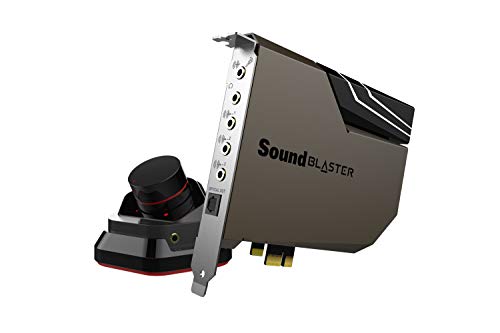
Creative Sound Blaster AE-7
The Creative Sound Blaster AE-7 is the strongest PCIe pick in this guide, and it is the one to buy if you want the widest IQ capture from an internal card. It uses an ESS SABRE-class 9018 DAC, a quad-core audio processor, and a discrete Xamp headphone amplifier, a combination aimed at high-resolution listening that also serves SDR well. Its headline figures are a 127 dB dynamic range and playback at up to 32-bit depth and 384 kHz, which puts it ahead of every other internal card here on raw resolution.
For SDR use, the important part is the input side. The AE-7 carries a dedicated line-in alongside its microphone input, so you can feed stereo IQ audio from a receiver straight into the card without a separate interface. The high sample rate means you can watch a wide slice of spectrum in one pass, and the high dynamic range helps weak signals survive next to strong ones. ASIO support keeps latency low in SDR software, which matters when you tune quickly across a band and want the waterfall display to keep up.
The card also handles discrete 5.1 output and virtual 7.1 surround, with Dolby and DTS encoding, but those features are secondary here. It needs a free PCIe slot and a desktop case, so it is not an option for laptop listeners.
Creative Sound Blaster Z SE
The Creative Sound Blaster Z SE is the value pick among the internal cards, and it is the sensible choice if the AE-7 is more card than your setup needs. It is a PCIe card built around the Sound Core3D audio processor, with a stated 116 dB signal-to-noise ratio and recording and playback at up to 24-bit depth and 192 kHz. That 192 kHz ceiling covers a generous slice of spectrum for most HF and VHF listening, and the 24-bit converters give enough dynamic range for everyday SDR work.
Like the AE-7, the Z SE has a line-in for stereo IQ audio, and it supports ASIO drivers for low-latency work in SDR software. Its 600-ohm headphone amplifier drives demanding headphones directly, which is useful for long listening sessions when you are chasing weak signals. Discrete 5.1 output and virtual 7.1 surround come with Dolby Digital Live and DTS support, so the card doubles as a capable card for films and games when the radio is off.
The trade-offs are modest. Its sample rate tops out at 192 kHz rather than the 384 kHz of the AE-7, so you see a narrower slice of spectrum in one pass. It still needs a free PCIe slot, a desktop case, and Windows drivers from Creative.
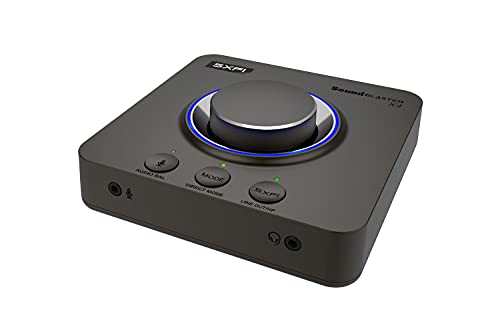
Creative Sound Blaster X4
The Creative Sound Blaster X4 is the flexible pick, an external USB sound card that works with desktops and laptops alike. It is a 24-bit, 192 kHz USB DAC and amplifier with Super X-Fi processing, multi-channel output, and 7.1 discrete surround. For SDR listeners, its most important feature is written into its name: it has a line-in, alongside optical-in, optical-out, mic-in, and headset-in connections, so you can feed IQ audio from a receiver into the unit over USB without opening your computer.
The external design is a real advantage for SDR use. The conversion happens outside the computer case, away from the electrical noise of fans, graphics cards, and power supplies, which can mean a cleaner IQ signal in a noisy desktop. It connects over USB-C or USB-A, so it moves easily between a desktop, a laptop, and a portable field setup. The 24-bit, 192 kHz resolution matches the Z SE and the Xonar SE, giving you the same wide view of the band from a device that fits in a bag.
There are limits to keep in mind. USB audio depends on the USB bus and the driver stack, so it can be slightly less steady than a PCIe card under heavy load, and you should use a direct port rather than a crowded hub. The X4 is also a general-purpose sound card first, so its control software is aimed at gaming and films rather than radio work.
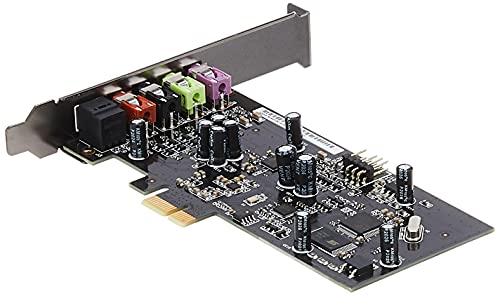
ASUS Xonar SE
The ASUS Xonar SE is the simple PCIe pick: a straightforward internal card that covers the SDR essentials without extra features you may never use. It is a 5.1-channel PCIe sound card with a stated 116 dB signal-to-noise ratio and playback and recording at up to 192 kHz and 24-bit depth. That matches the Z SE on the two figures that matter most for SDR, sample rate and signal-to-noise ratio, in a card with a simpler design.
For SDR use, the Xonar SE gives you a line-in for stereo IQ audio and a headphone amplifier rated for headphones up to 300 ohms. The 192 kHz sample rate covers a wide slice of spectrum in one pass, and the 24-bit converters give enough dynamic range for general listening. Its straightforward driver setup and Windows 10 compatibility make it an easy install in a desktop that already has a free PCIe slot, and its 5.1-channel output covers films and games when you are not listening to the radio.
The Xonar SE is less ambitious than the Creative cards. It does not list ASIO support as prominently, so low-latency performance depends more on the standard Windows audio path, and it lacks the higher sample rates and the more powerful headphone amplifier of the AE-7. It is also an internal card only, so laptop listeners should look at the USB picks instead. If you want a no-fuss internal card for a desktop SDR station and you do not need the extras, the Xonar SE is the simplest route to a clean 192 kHz line-in.
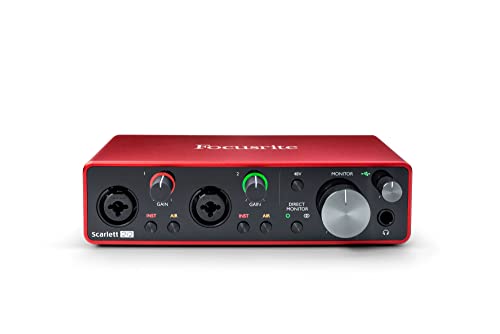
Focusrite Scarlett 2i2 3rd Gen
The Focusrite Scarlett 2i2 3rd Gen is the odd one out in this guide, and it earns its place because it is built for exactly the job SDR needs: clean analogue-to-digital conversion. It is a USB audio interface rather than a sound card, with two combination mic, line, and instrument inputs, 24-bit converters running at up to 192 kHz, and low-latency drivers. Its line inputs accept stereo IQ audio from a receiver, and its conversion stage is designed for recording, which means low noise and honest levels.
For SDR listening, the 2i2 has two clear strengths. First, the preamps and converters are clean, so weak signals are less likely to drown in interface noise. Second, the interface sits outside the computer on a USB cable, away from the electrical noise inside a desktop case. The two inputs also give you options: run one receiver into the stereo pair, or keep a second input free for another source. It works with laptops and desktops alike, and it is a proven, widely used interface with mature drivers.
There are a few things to check before buying. The 2i2 is a recording interface, so it has no surround output and no gaming software, and you will set levels with its front-panel gain knobs rather than a mixer panel. The 3rd Gen model has been superseded by a 4th Gen version, so confirm that the 3rd Gen listing is still sold and in stock before ordering, and do not confuse the two generations when you check the listing. Used this way, as a clean USB front end for IQ audio, the 2i2 is the most recording-focused pick in this guide.
Who Should Skip It
A dedicated sound card is not the right buy for every SDR listener, and a few setups do not need one at all. If your SDR receiver connects over USB and sends digital IQ data straight to your software, as many popular dongle-style receivers do, a sound card adds nothing: the conversion already happened inside the receiver. Check how your receiver outputs its signal before spending anything.
Laptop listeners with no free PCIe slot should skip the internal cards here entirely. The AE-7, the Z SE, and the Xonar SE all need a desktop case and a spare slot, and they cannot be fitted to a laptop. The X4 and the 2i2 are the picks for portable use, and an external USB device is the only practical route.
You can also skip an upgrade if you only listen to narrowband signals and your current onboard line-in already sounds clean. A narrow voice or Morse signal needs far less bandwidth than a wideband scan, and a quiet onboard input may serve you well. Similarly, if your listening is casual and your antenna and receiver are the weak links, put your effort there first: a better antenna usually improves reception more than a better converter.
Finally, skip any card whose drivers do not support your operating system. Internal cards in particular depend on Windows driver support, and an unsupported card is a dead slot in your case. Confirm operating system support and the return window on the listing before ordering.
FAQ
Do I need a sound card if my SDR receiver connects over USB?
Not usually. Many USB SDR receivers digitise the signal inside the receiver and send digital IQ data to your software, so no sound card is involved. A sound card matters when your receiver has an analogue IQ output on a stereo cable, which is common on standalone receivers and older designs. Check whether your receiver outputs analogue audio or digital data over USB before buying.
What sample rate do I need for SDR listening?
It depends on how much spectrum you want to see at once. A 192 kHz sample rate covers roughly 192 kHz of spectrum in one pass, which suits most HF and VHF listening. A 96 kHz rate covers about half of that, while a 384 kHz rate shows a wider band still. Higher rates are better for wideband scanning, but they also use more processor power, so match the rate to your listening habits and your computer.
Can I use the microphone input instead of the line-in?
You should not. Microphone inputs run at the wrong level for a receiver output, are often mono, and add more noise than a line-in. Feeding a line-level IQ signal into a mic input can also overload it and distort the signal. Always use a dedicated stereo line-in for IQ audio, and set the input level so strong signals stay below clipping.
Should I choose a PCIe card or a USB interface for SDR?
Choose a PCIe card for a fixed desktop station, where it gives a stable connection and low-latency drivers in a machine that stays put. Choose a USB interface for a laptop, a portable setup, or a noisy desktop, since the conversion happens outside the case and the device moves between computers. Both routes work well for SDR; the right choice depends on your computer and where you listen.
Final Verdict
The Creative Sound Blaster AE-7 is the best sound card for SDR on a desktop, with the highest resolution, the widest capture, and the cleanest conversion of the internal cards here. If its tier is more than you need, the Sound Blaster Z SE gives you the same 192 kHz ceiling and a proper line-in for less, and it is the value pick for a dedicated listening post. The ASUS Xonar SE is the simplest internal option if you want a straightforward install without extra features.
For laptops and portable use, the choice is between the Sound Blaster X4 and the Focusrite Scarlett 2i2 3rd Gen. The X4 is the more versatile device, with optical and headset connections alongside its line-in, while the 2i2 is the cleaner recording-focused front end. Pick the X4 for flexibility across computers, and the 2i2 when conversion quality is your top priority.
Product and ASIN Reference
| Product | ASIN |
|---|---|
| Creative Sound Blaster AE-7 | B07T9YYVV6 |
| Creative Sound Blaster Z SE | B08HYPH5T6 |
| Creative Sound Blaster X4 | B0953LL5R6 |
| ASUS Xonar SE | B07HCX1NY9 |
| Focusrite Scarlett 2i2 3rd Gen | B07QR73T66 |